
Budgeting and forecasting software that keeps the plan current
Budgeting and forecasting software turns your accounting history into an annual budget and then keeps a forecast next to it that moves with reality. Budgeter.ai drafts the budget from 12 to 24 months of actuals by category and month, and recalculates the forecast for the rest of the year on every sync.
Read-only connections. Encrypted data. Cancel anytime.
| Category | Jan | Feb | Mar | Apr | May | Jun | FY forecast |
|---|---|---|---|---|---|---|---|
| Revenue | 182k | 186k | 195k | 199k | 204k | 212k | $2.58M |
| Cost of revenue | 31k | 32k | 33k | 34k | 35k | 36k | $418k |
| Payroll | 118k | 118k | 124k | 124k | 131k | 131k | $1.57M |
| Marketing | 22k | 22k | 26k | 26k | 24k | 24k | $311k |
| Software | 9k | 9k | 9k | 10k | 10k | 10k | $116k |
| Rent and office | 12k | 12k | 12k | 12k | 12k | 12k | $144k |
FY budget, operating result
$12k
FY forecast, operating result
$21k
Months of actuals used
24
Example figures inside the product interface.
Budget and forecast are not the same number
The two words get used as if they meant the same thing. They do different jobs, and a finance process needs both.
The budget is a commitment
You build it once, before the fiscal year, and the leadership team signs off on it. It sets spending authority for each department and the revenue target sales is measured against. Its value comes from staying still. If you edit the budget every time a month disappoints, you lose the reference point that tells you how far the business has drifted from what you agreed.
The forecast is an estimate
It answers a different question, which is where the year will land if things continue as they are. Closed months are replaced by actuals, open months are re-estimated, and assumptions change when you learn something. A forecast that never moves is just a second copy of the budget, and it gives you no early warning about cash or hiring capacity.
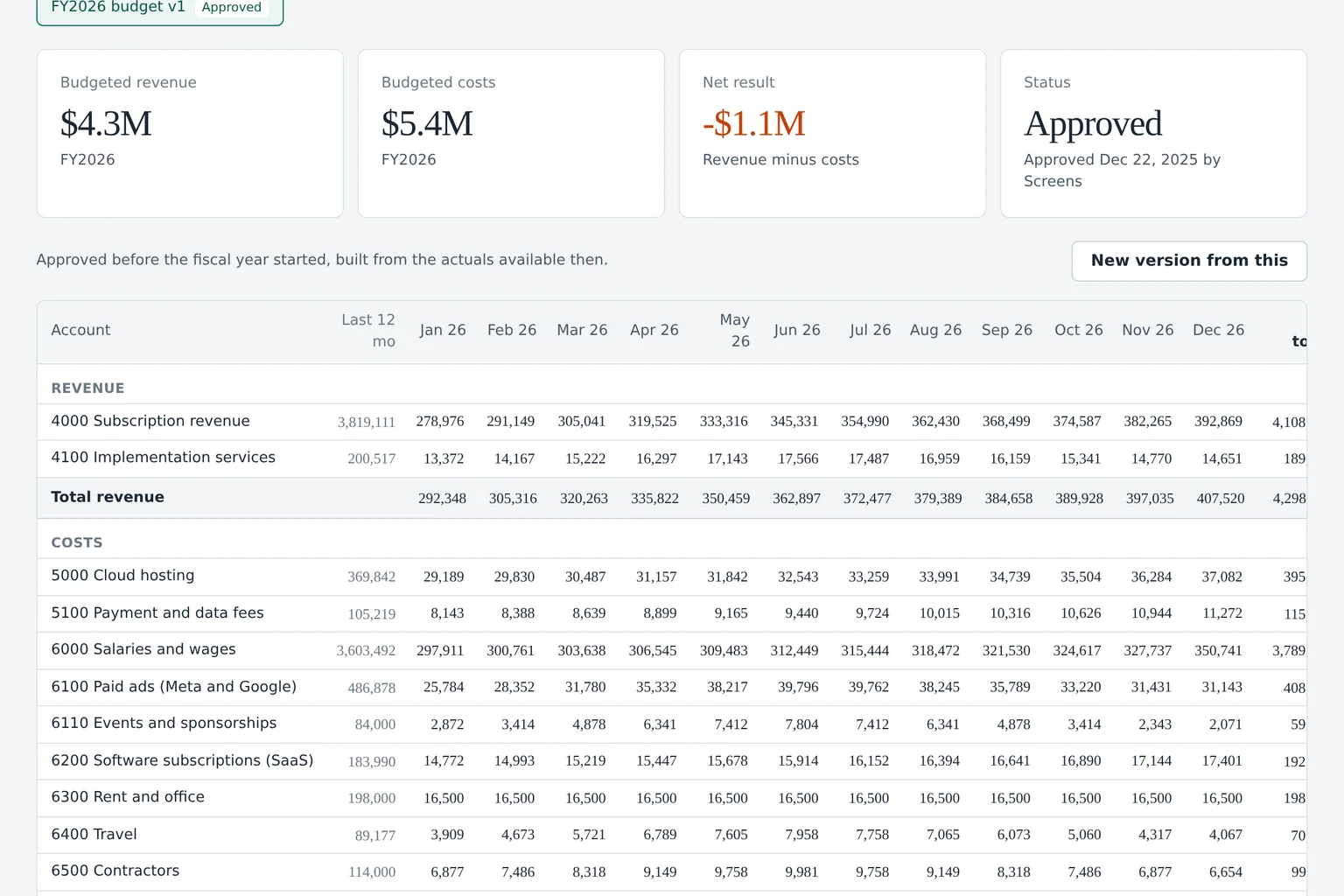
Good budgeting and forecasting software keeps both side by side in one model. Each row is an account or category, each column is a month, and for every month you can see the approved budget, the latest forecast and, once the month closes, the actual. Comparing the first and the last is your budget vs actual review. Comparing the forecast you made three months ago with what actually happened tells you how reliable your forecasting is, which is the subject of forecast vs actual variance analysis.
The practical test is simple. Ask your current setup how the year will end if the last quarter's trends continue, and how far that is from the plan. If the answer takes an afternoon of copying exports between tabs, the budget and forecast are living in separate places.
How the annual budget gets built from your history
A blank spreadsheet invites guesswork. Budgeter starts from what your books already know, which is how each category behaved over the last one to two years, and turns that into a monthly draft you edit rather than invent.
The draft is a starting point, not a verdict. Every line shows the method behind it, so you can see why March marketing is higher than February and override it in one click if the plan for next year is different.
- Seasonality from the same month last year With 24 months of actuals each month is compared with its counterpart a year earlier, so a slow August or a strong December carries into the draft instead of being averaged away.
- Run rate for steady costs Rent, software subscriptions and insurance are projected from their recent monthly level, with known renewals and price changes applied on the month they happen.
- Growth applied to revenue drivers Revenue lines carry the trend you set, for example 2 percent a month, starting from the latest closed month rather than from an old average.
- One-off items removed A legal settlement or a one-time hardware purchase is flagged so it does not repeat in every month of next year.
- Categories that match how you manage Ledger accounts roll up into categories and departments, so a department owner reviews ten lines, not the full chart of accounts.
From connected books to a live forecast
Setting up the first budget takes one working session. After that the forecast maintains itself.
-
01
Connect the ledger
Link QuickBooks Online or Xero with read-only access. Budgeter reads 12 to 24 months of history by account and month.
-
02
Review the draft budget
Each category gets a monthly draft built from its own history, seasonality and growth. You adjust the lines that need a decision.
-
03
Approve one version
The approved budget is locked as the yardstick for the year. Later edits create a new version instead of overwriting it.
-
04
Let the forecast run
Every sync adds fresh actuals, and the forecast for the remaining months is recalculated next to the fixed budget.
What makes the forecast useful is that it updates without anyone opening a file. When the accounting sync brings in a closed month, Budgeter swaps the estimate for the actual, recalculates the remaining months from the new run rate and shows how the full year forecast moved since the last sync. The change log tells you which lines caused the movement.
The same sync refreshes cash. Your operating forecast feeds the cash flow forecasting software view, which converts the profit and loss outlook into a 13-week and 12-month cash position, so a weaker revenue forecast shows up as a shorter runway the same day.
Questions go to the AI CFO in plain English. Ask why the full year forecast fell by 40,000 dollars since last month, or what happens to the result if the two planned hires slip to the third quarter, and the answer cites the lines and assumptions it used. Small Business includes 100 questions a month, Growth 600.
Forecast horizon depends on the plan, 24 months on Small Business, 36 on Growth and 60 on Scale and Enterprise. Scale adds a rolling forecast that reforecasts automatically after each month close, plus department budgets with owners and an approval workflow.
A worked example of budget and forecast drifting apart
A hypothetical 35 person agency approved a budget in December. Here is how the forecast diverged by the end of April, and what the team did about it.
Scroll sideways for all columns
| Line | Approved budget | Forecast today | Gap | What moved it |
|---|---|---|---|---|
| Revenue | $4,200,000 | $4,035,000 | -$165,000 | Two retainers ended in March |
| Contractor costs | $610,000 | $548,000 | -$62,000 | Less work to staff |
| Payroll | $2,480,000 | $2,480,000 | $0 | No change yet |
| Marketing | $190,000 | $236,000 | +$46,000 | Trade show added in May |
| Software and office | $360,000 | $352,000 | -$8,000 | One tool cancelled |
| Operating result | $560,000 | $419,000 | -$141,000 | Margin 13.3% to 10.4% |
The budget did its job
Because the December budget stayed fixed, the team can see exactly how much of the plan is at risk. Without that anchor the gap would have been absorbed quietly into a revised spreadsheet.
The forecast gave the warning
The lost retainers appeared in the forecast as soon as the March invoices stopped. By April the full year view already showed 141,000 dollars less operating result, eight months before year end.
The decision went into a scenario
The team modeled cancelling the trade show and pausing one hire. With scenario planning software they compared both options before picking one, then applied it to the forecast.
Forecasts and scenarios are estimates based on your data and assumptions, not financial, investment, tax or accounting advice.
Spreadsheets, small business tools and FP&A suites compared
Each option fits a stage. The question is how much manual work you accept and what you pay for the rest.
Scroll sideways for all columns
| What you need | Spreadsheet model | Simple forecasting tools | Demo-led FP&A suites | Budgeter.ai |
|---|---|---|---|---|
| First budget draft | Typed by hand | Basic projection | Built during implementation | Drafted from 12 to 24 months of actuals |
| Forecast updates | Manual export each month | Varies, often manual | Automated after setup | On every sync |
| Budget and forecast side by side | Separate tabs | Limited | Yes | Yes, with versions |
| Cash and runway from the same model | Another tab to maintain | Often included | Yes | Yes, 13-week and 12-month |
| Plain English questions | No | No | Varies by vendor | AI CFO chat |
| Published price | Free to start | LivePlan 15 to 40 USD a month | Quote after a demo call | From 149 USD a month |
A spreadsheet is the right first tool for a company of five. It becomes fragile when several people edit it, when the person who wrote the formulas leaves, or when the monthly export and paste takes longer than the review itself. Simple forecasting tools aimed at very small businesses keep the cost low but tend to stop at a single projection without a fixed budget beside it.
At the other end, mid-market platforms such as Datarails, Cube and Abacum share prices only after a demo, and Jirav lists business plans at 10,000 to 15,000 dollars a year. If you are weighing those suites, our guide to FP&A software walks through the evaluation. Budgeter publishes every plan on the pricing page with self-serve checkout, Enterprise included.
Habits that keep a budget useful all year
Phase the budget by month instead of dividing the annual total by twelve. A business with a strong fourth quarter will otherwise look behind plan for nine months and ahead for three, and nobody will trust the report.
Give every category an owner. A line without a name next to it is a line nobody explains. In Budgeter, department owners see their own lines and receive the overspend alert when it matters to them.
Keep assumptions written next to the numbers. Six months later, nobody remembers why software was budgeted at 9,000 dollars a month. A one sentence note saves the meeting.
A monthly rhythm that works
- Day 1 to 5. Books close, the sync brings in actuals and the forecast recalculates.
- Day 6. Owners review their variances and add a short explanation where the gap is material.
- Day 7. Leadership looks at the full year forecast against the budget and decides on any change in spending or hiring.
- Day 8. Agreed changes go into the forecast or a new budget version, and the cash view updates with them.
- Every quarter. The forecast and its assumptions feed the board update, with the original budget still visible for comparison.
Questions about budgeting and forecasting
Annual budgets, live forecasts and budget vs actual are part of every plan.
What is the difference between a budget and a forecast?
A budget is the plan you approve before the year starts and keep fixed, so you can measure performance against it. A forecast is your current best estimate of how the year will end, and it changes whenever new actuals or new information arrive.
How much history does Budgeter need to build a budget?
Twelve months of closed actuals is enough for a first draft. With 24 months the seasonality is clearer, because each month can be compared with the same month a year earlier rather than with its neighbors.
How often does the forecast update?
On every sync with your accounting system. New actuals replace the estimate for the month that closed, and the remaining months are recalculated from the latest run rate, seasonality and any assumptions you changed.
Can I change the budget after it is approved?
Yes, but as a new version. The original approved budget stays intact for budget vs actual, and the revised version sits next to it, so you always know which number the team agreed to and when it changed.
Which plan includes budgeting and forecasting?
Every plan, starting with Small Business at 149 dollars a month or 74 dollars a month on yearly billing. Higher plans add longer forecast horizons, headcount and revenue planning, department approvals and a rolling forecast after month close.
Related planning modules
Put a live forecast next to your budget
Start with a runway forecast from a few numbers, then connect your books and get a full annual budget drafted from your own history.
Forecasts and scenarios are estimates based on your data and assumptions, not financial, investment, tax or accounting advice.