
Expense control software that warns you before the month is over
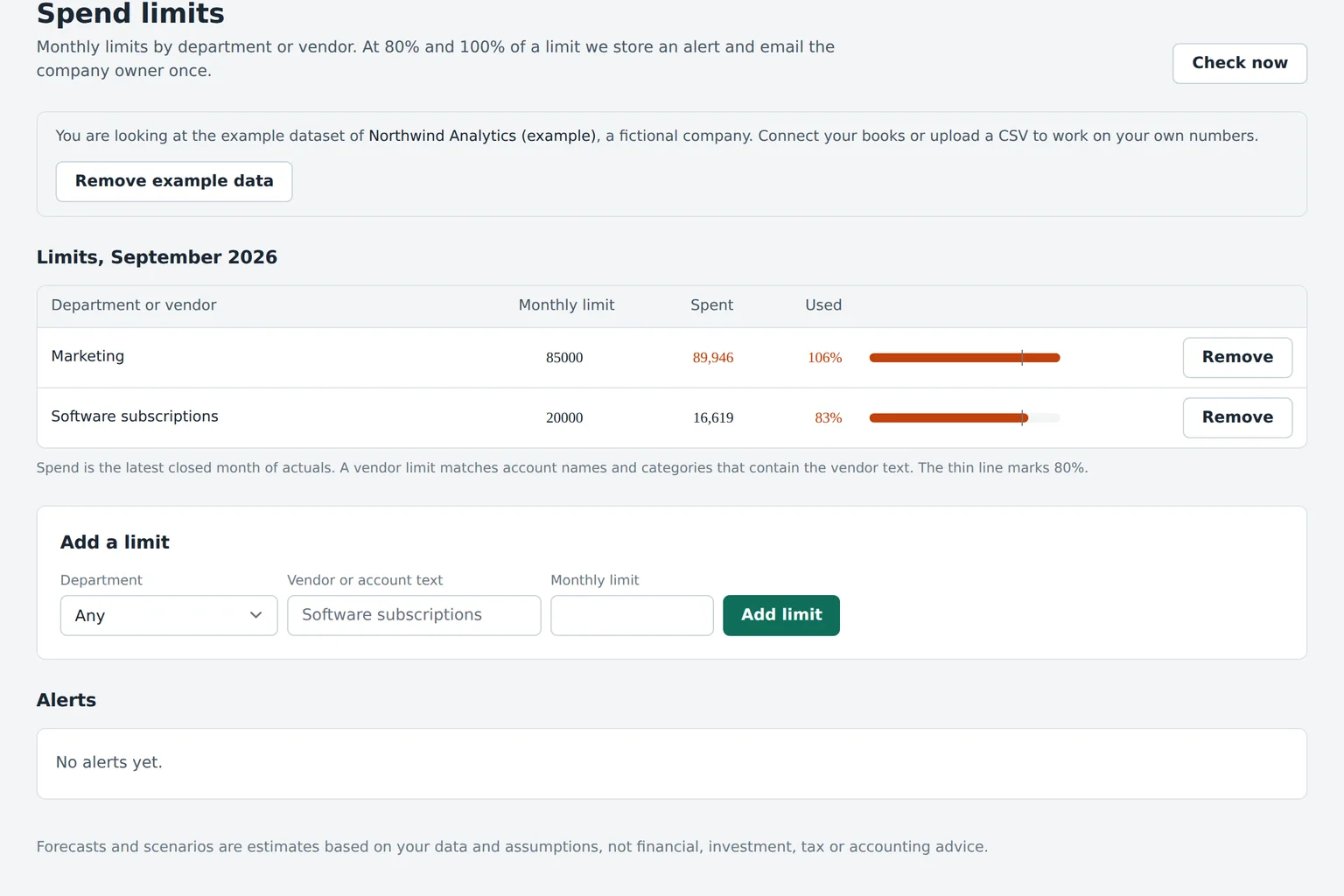
Expense control software tracks spending against a monthly limit while the month is still open, so overspend is caught when it can still be stopped. Budgeter.ai sets limits per department and vendor, follows every synced transaction and emails the budget owner at 80 and 100 percent of the limit.
Read-only connections. Encrypted data. Cancel anytime.
-
Marketing, paid ads Department $21,300 of $30,000
71% used
-
Engineering, cloud and tools Department $18,900 of $22,000
86% used · 80% alert sent to owner
-
Design tools Vendor $2,160 of $1,800
120% used · over limit, owner and finance notified
-
Sales, travel Department $2,850 of $6,000
48% used
-
Recruiting agencies Vendor $4,000 of $12,000
33% used
-
Office and facilities Department $7,350 of $9,500
77% used
Example figures inside the product interface.
Overspend is a timing problem
Most companies already know when they overspent. They know it about three weeks too late. The books close on the 10th, the variance report goes out on the 15th, and by then the next month's campaigns, contractors and subscriptions are already running. A monthly report explains the past. It does not change it.
Expense control moves the check into the month. Each department and each important vendor gets a limit, spend is tracked as transactions arrive, and the person who owns the budget hears about it at 80 percent, while there are still options. Pause a campaign, push a purchase into next month, or ask for more budget with a reason attached.
This is different from the monthly budget vs actual review, which looks at closed months and decides whether a gap is timing or trend. The two work together: limits keep the month small, the review keeps the plan honest.
What a good spend limit has
- One owner
- A named person, not a team. Alerts to a shared inbox are read by nobody.
- A monthly amount
- Taken from the approved budget so limits and plan never disagree.
- Two thresholds
- 80 percent as a warning with time to react, 100 percent as a fact that finance needs to see.
- The transactions behind it
- An alert without the list of charges starts a hunt. With it, the owner can answer in one reply.
- A path to change it
- Limits that cannot be raised get ignored. Limits that can be raised with a reason get respected.
Catching SaaS subscription creep
Software subscriptions are the cost line that grows quietly. Each one is small, approved by someone different and renewed automatically.
Picture a hypothetical 60 person company. In January its software line is 14,000 dollars a month. Nobody decides to double it. A designer adds a plugin, sales trials a dialer and keeps it, engineering upgrades a monitoring plan, and two tools renew at a higher seat count because people who left were never removed. By December the line is 21,500 dollars and nobody can say which change caused it.
A vendor limit turns that slow drift into a visible event. When a vendor or a tools category crosses 80 percent of its limit, the owner sees the new charge and the vendor name in the alert. The AI CFO can answer questions such as "which software vendors grew more than 20 percent since March" with the vendors, the amounts and the months, which makes the yearly cleanup a ten minute task instead of a project.
Scroll sideways for all columns
| Vendor type | March | September | Change |
|---|---|---|---|
| Design suite | $1,450 | $2,160 | +49% |
| Sales dialer | $0 | $1,320 | new |
| Cloud monitoring | $2,100 | $2,900 | +38% |
| Office suite | $1,180 | $1,240 | +5% |
| Project management | $960 | $880 | -8% |
| All software vendors | $14,000 | $17,950 | +28% |
Forecasts and scenarios are estimates based on your data and assumptions, not financial, investment, tax or accounting advice.
How spend limits work in Budgeter
Setting up limits takes less time than the first monthly review it replaces.
-
01
Name the departments and owners
Create cost centers such as marketing, engineering and operations, and assign one person who answers for each budget.
-
02
Set monthly limits
Put a limit on each department and on the vendors that matter, starting from the approved budget or from the last six months of spend.
-
03
Let the sync track spend
Every sync from QuickBooks Online or Xero adds new transactions to the right limit, so the meter moves during the month.
-
04
Act on the alert
At 80 percent the owner gets an email with the transactions behind it. At 100 percent finance is copied and the line turns red.
Limits start from the budget, so if you have not built one yet, our budgeting and forecasting software drafts it from your actuals first. Smaller companies with one budget owner often begin with budgeting software for small business and its monthly overspend email, then add live limits on Growth.
Approval workflow on Scale
Larger teams need more than an alert. They need a record of who asked for more, why and who said yes.
- Department budgets with owners Each department has its own budget version, and its owner edits only that.
- Requests with a reason An owner asks for a higher limit or a transfer between lines and writes why, for example a trade show moved forward by a month.
- Approval by finance The request goes to the approver you choose. Approved changes update the budget and the forecast at once.
- Audit log Every change keeps the old value, the new value, the person and the time, which helps when the board asks why marketing grew.
- Roles and permissions Editors, approvers and read-only viewers per department, for up to 30 users on Scale.
Spreadsheets and card tools and Budgeter compared
There are three common ways to control spend. They solve different parts of the problem, and many companies use two of them.
Scroll sideways for all columns
| Need | Spreadsheet tracker | Corporate card or bill pay limits | Budgeter.ai |
|---|---|---|---|
| Covers all spend in the books | Only what you paste | Only spend through that card or tool | Everything that reaches QuickBooks Online, Xero or the bank feed |
| Limit tied to the budget | If you link the tabs | Set separately | Taken from the approved budget |
| Alerts at 80 and 100 percent | No | Usually per card | Per department and per vendor |
| Can stop a payment | No | Yes, at the card | No, read-only by design |
| Updates the forecast | Manually | No | Yes, cash and budget forecast |
| Explains the change | Written by hand | Transaction list | AI CFO answer with figures |
Card and bill payment tools are good at the point of purchase and can decline a charge. They see only what passes through them, and payroll, contractors, invoices paid by transfer and annual contracts sit elsewhere. Budgeter looks at the whole ledger, so its limits cover every cost line, and it pairs well with a card tool that enforces the hard stop.
Large FP&A suites offer department budgeting too, but Datarails, Cube and Abacum quote prices only after a demo, and Jirav lists business plans at 10,000 to 15,000 dollars a year. Budgeter's Growth plan, which includes spend limits, is $599 a month or $299 billed yearly, as shown on the pricing page.
Rolling out limits without friction
Business budgeting tools only work if the people who spend accept them. A few habits make the difference between respected limits and a nuisance.
-
Start with three or four lines
Paid marketing, software, contractors and travel cover most discretionary spend. Add more once the first alerts have proved useful.
-
Agree the numbers with each owner
A limit the owner helped set is a commitment. A limit handed down is a target to argue with.
-
Phase limits by month
An event in May needs a higher May limit. One twelfth of the annual figure triggers false alarms in busy months.
-
Review the alerts once a quarter
A line that alerts every month needs a new limit or a real decision. Read the pattern with forecast vs actual variance analysis to see whether the plan or the spending should move.
Questions about expense control
Access to your accounting system is read-only and your data is never used to train public models. Read more on the security page.
What is expense control software?
It is software that compares spending with an agreed limit while the month is still running and warns the responsible person before the limit is passed. It works on top of your accounting data rather than replacing your card or bill payment tools.
Does Budgeter block card payments or bills?
No. Budgeter has read-only access to your books and bank feed, so it cannot stop a payment. It makes overspend visible early and routes it to the person who can act, which is where most of the saving comes from.
Which plan includes spend limits?
Spend limits per department and vendor with alerts at 80 and 100 percent are part of Growth, Scale and Enterprise. Department budgets with owners and an approval workflow for budget changes are part of Scale and Enterprise.
How quickly does spend show up against a limit?
As soon as the transaction reaches your accounting system or bank feed and the next sync runs. Card spend that your bookkeeper posts weekly appears weekly, bank feed items usually appear within a day.
Can a department head see only their own budget?
Yes. Read-only viewers can be limited to the departments they own, so a marketing lead sees marketing spend, limits and alerts without access to payroll or the rest of the ledger.
Know about overspend while you can still fix it
Start with a runway forecast from a few numbers, then connect your books and set limits for the departments and vendors that move your costs.
Forecasts and scenarios are estimates based on your data and assumptions, not financial, investment, tax or accounting advice.